
10월 기준, Rust for Linux는 linux-next에 있으며 stable이 아닙니다.
따라서 이 글은 Linux 6.1 stable이 나오기 전에 구식이 될 수 있습니다.
modules, out-of-tree#
커널 모듈을 개발하는 방법은 크게 두 가지가 있습니다. In-Of-Tree와 Out-Of-Tree 방식입니다. 이 글에서는 Out-Of-Tree 방식으로 Rust 커널 모듈을 만들어 보겠습니다.
시작하기 전에#
커널이 CONFIG_RUST=y로 컴파일되었는지 확인하기#
다음 명령어로 확인합니다.
zcat /proc/config.gz | grep -i CONFIG_RUST=y결과가 CONFIG_RUST=y로 나오면 됩니다.
하지만 배포판 커널 이미지를 다운로드하거나 사전 설치된 경우에는 /proc/config.gz에서 확인할 수 없을 수도 있습니다.
$KDIR 준비#
$KDIR은 커널 소스의 경로입니다.
이 글에서는 CONFIG_RUST로 부팅에 사용된 커널 소스의 경로를 의미합니다.
제 경우에는 ~/Develop/linux입니다.
# /home/pmnxis/Develop/linux
export KDIR=$HOME/Develop/linux
코드 살펴보기#
코드 rust_out_of_tree.rs 를 미리 살펴봅시다…
라이선스와 import#
| |
1~3번 줄은 파일의 라이선스 정보를 나타냅니다.
회사에서 코드를 작성하는 경우 GPL-2.0 대신 SomeCompanyName을 사용하거나 그대로 GPL-2.0을 유지합니다.
| |
5번 줄은 이 코드에서 사용할 Rust for Linux 라이브러리를 가져오는 것을 의미합니다.
다음 예제에서 C로 작성된 모듈은 이렇게 include합니다.
| |
| |
8번 줄은 module trait의 구현체입니다.
9번 줄은 모듈의 이름으로, C로 작성했을 때 *.ko의 name 필드에 해당합니다.
10~12번 줄은 아래의 C로 작성된 예제와 동일한 목적의 필드입니다.
| |
macro_rule! module을 간단히 살펴보겠습니다. 자세한 내용은 여기를 참고하세요.
module!
See details ⇀실제 구현#
| |
동작을 추측해보면…
- init (
insmod?) 시,Rust out-of-tree sample (init)텍스트를 어딘가에 출력 vec<i32>[72, 108, 200]이RustOutOfTree구조체와 함께 커널 메모리 공간에 저장됨- 모듈을 drop (
rmmod?) 할 때,[72, 108, 200]텍스트를 출력
여기서 주의 깊게 봐야 할 부분이 있습니다.
| |
24번 줄에서 try_push는 std::Vec에는 존재하지 않습니다. Rust 커널 프로그래밍에서는 std::Vec::push 대신 try_push를 사용해야 합니다.
alloc::vec::Vec
See details ⇀또한 20번 줄과 33번 줄에 `init`과 `drop` 함수가 있습니다. 이 코드는 `impl for` 패턴으로 해당 함수들을 구현하고 있습니다.
구현체와 그 철학에 대해서는 이후 글에서 설명하겠습니다.
코드 실행#
빌드하기#
make LLVM=1Rust를 지원하는 커널 빌드가 LLVM으로 이루어졌으므로,
커널 모듈도 LLVM으로 컴파일합니다.
모듈 설치#
sudo insmod ./rust_out_of_tree.ko컴파일 후 프로젝트 디렉토리 안에 rust_out_of_tree.ko가 생성됩니다.
기존에 사용하던 것처럼 insmod로 모듈을 설치할 수 있습니다.
결과 확인#
# do `sudo rmmod rust_out_of_tree` if you already install the module`

# clear all of dmesg log
sudo dmesg -C

# install the module
sudo insmod ./rust_out_of_tree.ko

# see log
dmesg

# uninstall the module
sudo rmmod rust_out_of_tree

# check log again.
dmesg
위 명령어로 실제 결과를 확인할 수 있습니다.
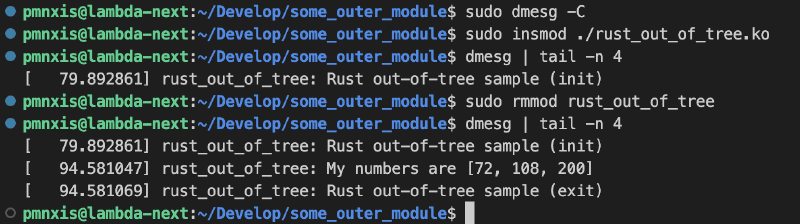
[72, 108, 200]이 출력됩니다.
결론#
이 간단한 커널 모듈에서 다음과 같은 내용을 정리할 수 있습니다.
요약#
- 코드 상단에
use kernel::prelude::*;를 사용해야 합니다. module!매크로로 설명을 정의하고 자신의 구조체를 커널 모듈에 등록합니다.kernel::Module템플릿 함수 …. -WIP-- 커널 프로그래밍에서는
std::Vec대신alloc::vec::Vec를 사용합니다. pr_info는C에서 사용하는 방식과 동일합니다.
참고#
- https://github.com/Rust-for-Linux/rust-out-of-tree-module
- https://www.kernel.org/doc/html/latest/kbuild/modules.html
- https://github.com/Rust-for-Linux/linux
- https://rust-for-linux.github.io/docs/kernel/prelude/index.html
- https://rust-for-linux.github.io/docs/kernel/prelude/macro.module.html
- https://rust-for-linux.github.io/docs/kernel/prelude/struct.Vec.html