It has been quite a while since ZEN4 started selling, and ZEN3 has also gone through several internal stepping/revision changes that seem to have improved things, so I feel this is an appropriate time to write this article. I originally posted this on other communities as well, and while it may seem tangential to development, it deals with CPU internals, so I am reposting it on my dev blog.
Instruction L1/L2 Cache Failures Occur When Power Consumption Changes Drastically#
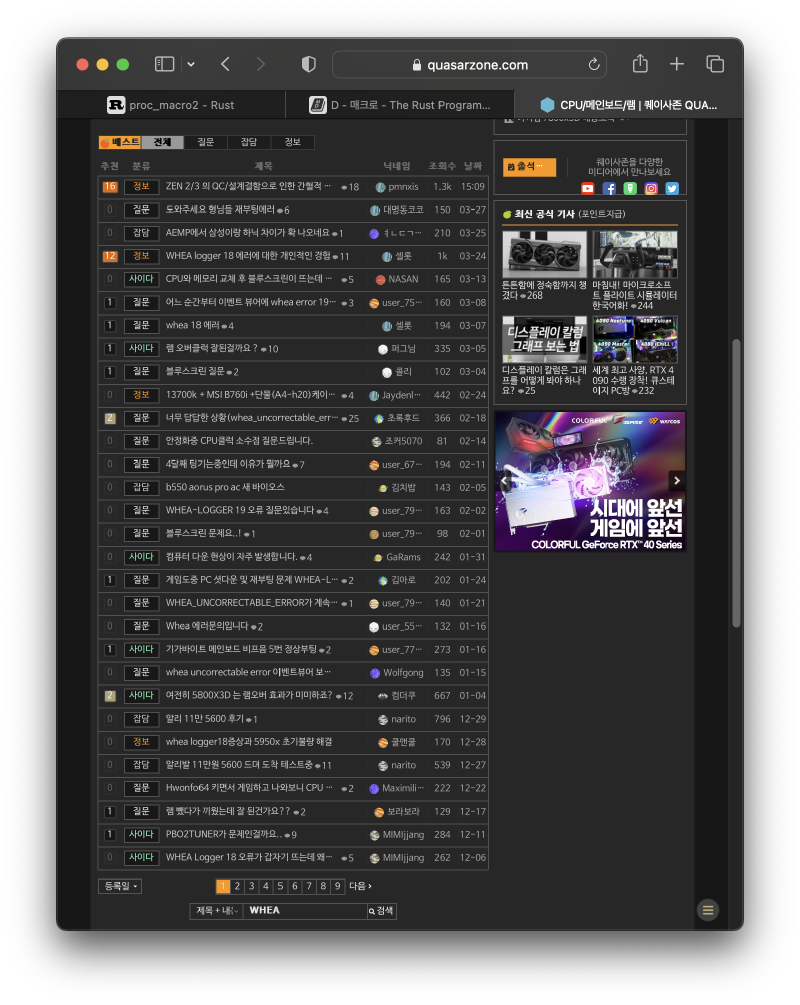
Just searching for “WHEA” on Quasarzone yields countless posts.
In the past, numerous people reported these issues while using AMD Zen2/Zen3:
- WHEA 18 errors suddenly appear in the Windows Event Logger.
- The system suddenly shuts down. [Halt] (no logs found)
- The system suddenly resets. [Reset] (no logs found)
- These symptoms occur even when the system is idle.
- Disabling C-State reduces the frequency of these issues.
- “Just disable C-State.”
I also experienced these issues when I was using a 3950X, and it cost me an enormous amount of time. Eventually, I went from the 3950X to a 5950X (a recent stepping revision), and in between, I temporarily used a 5900X that I purchased separately.
This led to a situation where my computers self-replicated and I ended up with two systems. I also purchased three motherboards during this process.
If you have read this far, you will have noticed a few key terms:
| Keyword 1 | Keyword 2 | Keyword 3 |
|---|---|---|
| Instruction L1, L2 cache | C-State | Reset/Halt |
What is C-State?#
Let me explain C-State first. Source: https://www.dell.com/support/kbdoc/ko-kr/000060621/c-state%EB%8A%94-%EB%AC%B4%EC%97%87%EC%9D%B8%EA%B0%80
C-State is a feature that reduces CPU power consumption, minimizing it as much as possible when the CPU is underutilized.
In practice, whether on AMD or Intel, the power consumption difference between C-State enabled and disabled during PC idle is quite significant when measured with a UPS – around 10W to 20W. That difference alone is enough power to run one of the new Intel Alderlake N100 Mini PCs. Furthermore, this feature has been around since the 1990s, so it is essentially a well-established feature that should just work reliably.
What is Instruction L1/L2 Cache?#
Let me start with the memory model taught in undergraduate “Computer Architecture” courses in Computer Science departments.
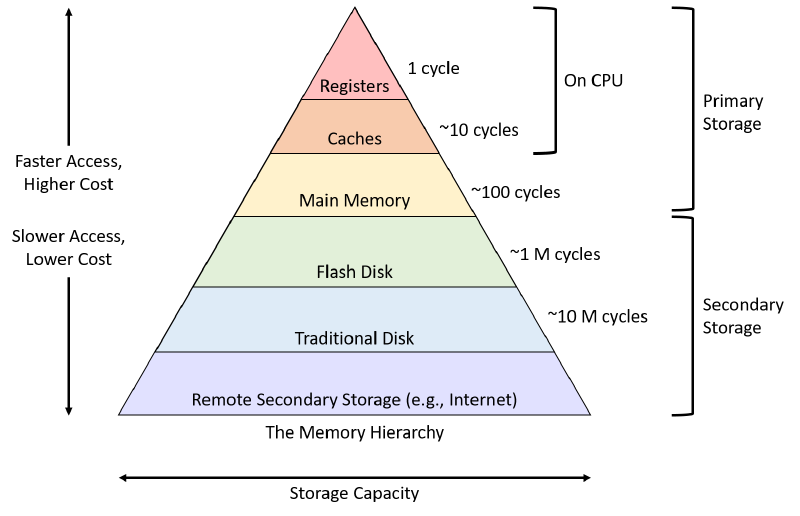
[Source: https://diveintosystems.org/book/C11-MemHierarchy/mem_hierarchy.html ]
The modern memory system is structured in this pyramid-like hierarchy.
From registers at the very top, through cache, down to Flash Disk and beyond, access time and capacity scale proportionally as you go down.
From the CPU’s perspective, accessing a register takes the shortest time, but the cost per area for registers is extremely high.
The further down you go, the more time it takes, but the cheaper it becomes.
Although this diagram does not show the exact capacity differences between registers/cache/Main Memory, the allocation of capacity depending on the system and its purpose is very important. The key is in “how you divide it.” One thing the user can control is to just pack in as much DRAM as possible.
So what exactly is the Instruction L1/L2 cache?
The CPU needs cache not only for fast data access/reads,
but also for fast instruction execution.
If the data needed for reading or the instructions being processed are not in the cache, the CPU effectively stalls while fetching from DRAM (main memory). (We will not consider the pipelining concept here.)
The L1/L2 designation refers to levels: L1 is the space closest and fastest for each CPU core to access, while L2 is a slightly more distant level (though still much closer than DRAM).
Coming back to Zen2/3, the CPUs from the Zen2/3 generation with 16 cores have the highest core count. They adopted a multi-die structure, packaging two groups of 8 cores together.
So in reality, the memory model does not form a single pyramid shape as shown above. Instead, there are two pyramids on top of one pyramid, and on top of those two pyramids, there are 8 additional pyramids each.
Detailed Report on the Symptoms Mentioned Above#
The majority of users who build their own PCs use Windows. If you experienced the issues mentioned in this article,
you would have seen a WHEA18 error in the Windows Event Logger, or the system would have shut down (reset) or frozen (halt) without any error logged at all. Whether it is a reset or halt likely depends on the motherboard. I confirmed this by using Asrock/Gigabyte/Asus boards with B550/X570 chipsets, all three of which exhibited errors in different ways.
To analyze this problem accurately, we should not be looking at Windows but rather finding answers in the Linux community.
- [Correctable MCE errors logged for CPU0/CPU12 L1 instruction cache with AMD Ryzen 9 3900X 12-Core Processor] https://bugzilla.redhat.com/show_bug.cgi?id=1830404
- [Random freezes and reboots AMD Ryzen] https://bugzilla.kernel.org/show_bug.cgi?id=210261
(There are many more reports beyond these two links, but I will only post these two for now.)
The threads themselves are very long, so here is a summary:
At random times, the errors below appear and the system freezes. And replacing the CPU just fixes it.
Enabling C-State prevents or reduces the occurrence of the issue.
May 01 15:06:59 kernel: mce: [Hardware Error]: Machine check events logged
May 01 15:06:59 kernel: [Hardware Error]: Corrected error, no action required.
May 01 15:06:59 kernel: [Hardware Error]: CPU:12 (17:71:0) MC1_STATUS[Over|CE|MiscV|AddrV|-|-|SyndV|-|-|-]: 0xdc20000000030151
May 01 15:06:59 kernel: [Hardware Error]: Error Addr: 0x000000076da32ae0
May 01 15:06:59 kernel: [Hardware Error]: IPID: 0x000100b000000000, Syndrome: 0x000000001a030507
May 01 15:06:59 kernel: [Hardware Error]: Instruction Fetch Unit Ext. Error Code: 3, IC Data Array Parity Error.
May 01 15:06:59 kernel: [Hardware Error]: cache level: L1, tx: INSN, mem-tx: IRD
May 01 15:06:59 kernel: mce: [Hardware Error]: Machine check events logged
May 01 15:06:59 kernel: [Hardware Error]: Corrected error, no action required.
May 01 15:06:59 kernel: [Hardware Error]: CPU:0 (17:71:0) MC1_STATUS[Over|CE|MiscV|AddrV|-|-|SyndV|-|-|-]: 0xdc20000000030151
May 01 15:06:59 kernel: [Hardware Error]: Error Addr: 0x0000000fbedc2ae0
May 01 15:06:59 kernel: [Hardware Error]: IPID: 0x000100b000000000, Syndrome: 0x000000001a030507
May 01 15:06:59 kernel: [Hardware Error]: Instruction Fetch Unit Ext. Error Code: 3, IC Data Array Parity Error.
May 01 15:06:59 kernel: [Hardware Error]: cache level: L1, tx: INSN, mem-tx: IRD
Speculative Analysis of the Error Cause#
This particular condition occurs extremely rarely (a CPU running at 3GHz or above executes 3,000,000,000 cycles per second, so from a cycle perspective, occurring once every 30 minutes to 24 hours is extremely rare – but this is not saying it is rare from a user’s perspective).
The clue was found in the C-State feature mentioned above:
- If C-State is enabled, the power delivered to the CPU core goes from very low to very high in a very short time.
- If C-State is disabled, the power delivered to the CPU core goes from slightly low to very high in a very short time.
So the cause relates to the rapid change in power delivered to the CPU core affecting the CPU Instruction L1/L2 cache.
While executing instructions, if the instructions themselves that the CPU fetches from the cache are corrupted, the CPU cannot execute them. It cannot proceed further, and in fact, even producing a core dump (memory dump) in this case would be a miracle. [Broadly speaking, there are two approaches to memory debugging: one is to back up the entire memory via software, and the other is to dump memory using hardware equipment that costs more than a luxury car. In this case, only the latter can provide a proper analysis.]
While the contents of L1/L2 cache are said to be a mirror of DRAM (Main Memory), kept for faster access,
in actual operating system and program design, variables like Linux’s per-cpu variables are typically sized to match or be smaller than each architecture’s L1 cache size as a block unit. In SMP (multi-core) systems, there are values where the address and memory information are stored in DRAM, but the accurate information is presumed to reside in the cache rather than DRAM, for faster read/write without going to DRAM. If L1/L2 becomes unreliable, variables with per-cpu-like characteristics (values used by computer programs) would become unusable, and this can similarly affect instructions.
Whether the root cause is truly the rapid fluctuation in power delivered to the CPU is ultimately speculation,
but the fact that so many people are reporting L1/L2 cache problems is, in my personal opinion, recall-worthy.
The per-cpu details I mentioned later are not taught at the undergraduate level, but CPU L1/L2 cache is undergraduate-level knowledge, and there appears to be a fundamental design miss.
Detailed link about per-cpu: http://jake.dothome.co.kr/per-cpu/
How Are AMD and Distributors Responding?#
So how are AMD and distributors responding? Looking at how distributors check for defects: they boot the system and run a benchmark program. That is it. In reality, finding such problems is very difficult unless you use professional equipment like Trace32.
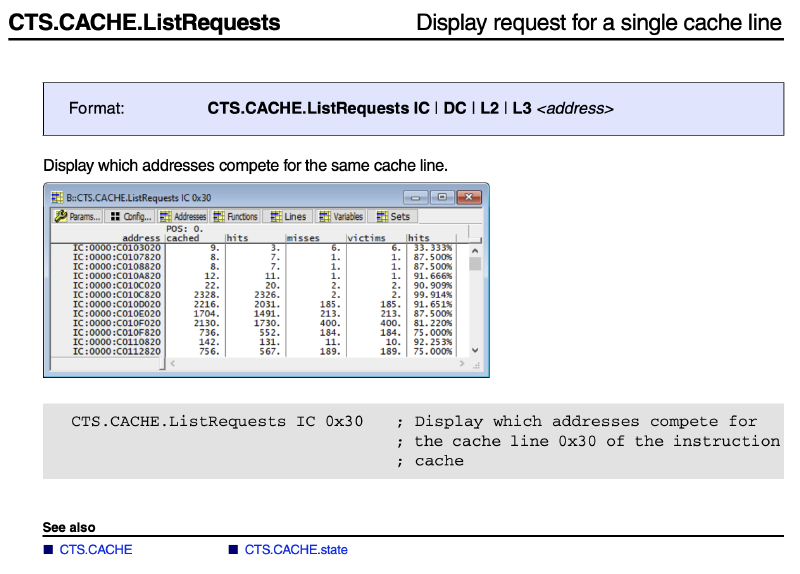
With Trace32, you can observe all CPU values in real time. The most an average person or even most developers can do is access memory addresses, but there is no way to tell whether the value comes from DRAM or cache. While such advanced development tools are needed, it is practically impossible for distributors to perform after-sales service using these tools. Therefore, the service staff must also find themselves in a very difficult position regarding this issue.
From the consumer’s perspective, proving this defect and getting an exchange is extremely difficult.
In my opinion, the fault lies with AMD.
I believe the problem is that there were either QC failures initially, or that AMD failed to properly verify and fix these issues during silicon design before selling the product.
So does AMD publicly disclose or share information about defects in their CPUs?
No, they hide far more than Intel does.
For reference, Intel shared an Errata Sheet (a paper documenting design flaws and issues) for their recently released 13th generation:
[ Intel Raptor Lake S - Errata Details ] https://edc.intel.com/content/www/us/en/design/products/platforms/details/raptor-lake-s/13th-generation-core-processor-specification-update/errata-details/
However, AMD has not published Errata Sheets for the consumer Zen2: Family 17h Model 71h or Zen3: Family 19h Model 21h.
Those who purchase chips to design their own PCB circuits or write Linux kernel drivers may have heard of Errata Sheets and have occasionally found problems there, leading them to re-select components or work around silicon bugs in software.
It is deeply disappointing that AMD has not issued any notice about such a serious problem and has instead relied on internet posts telling people to disable C-State while hiding these issues.
I hope that AMD will change its ways and properly disclose defects in products that have serious issues with the memory hierarchy. I will close this article with a photo of a cat that loves memory.